Context Rot: Why Your AI Gets Dumber the Longer You Use It
Your AI starts brilliant and ends useless. It's called context rot — LLM performance degrades as context grows. Here's why it happens and how context engineering fixes it.

I was three hours into building platform-specific RSS feeds for my blog. Claude nailed the architecture, wrote the route handlers, wired up the XML templates. We were cooking.
Then I asked it to add the Twitter feed endpoint. It suggested I create… an RSS feed system. The exact system we’d just spent three hours building. Same session.
I stared at my terminal. Did it just forget the entire conversation?
Yeah. Sort of. The AI got dumber the longer I used it. It’s called context rot, and it’s probably your fault 😆☠️
What Is an AI Context Window?
The context window is the AI’s working memory. Everything you say, everything it says, every code block, every error log. It all piles up in one finite buffer. You can’t see it filling up, but you can definitely feel it when it’s full.
It’s measured in tokens. A token is roughly ¾ of a word. “JavaScript” is 3 tokens, a blank line is 1. Here’s the depressing math:
| Model | Context Window | Roughly… |
|---|---|---|
| Claude (Sonnet/Opus) | 200K tokens | ~150,000 words |
| GPT-4.1 | 1M tokens | ~750,000 words |
| Gemini 2.5 | 1M tokens | ~750,000 words |
200K sounds like a lot. It’s not. A single large source file can eat 5,000 tokens. A stack trace? 500. That RSS debugging session I mentioned? Probably 30,000+ tokens before I even noticed something was wrong.
And those bigger windows? Every model degrades well before hitting its limit. More context window doesn’t mean more usable context. Claude gets unreliable around 130K. The others aren’t much better.
What AI Context Rot Looks Like
Here’s how that RSS session actually went. First hour: Claude understood the whole routing architecture: Astro endpoints, XML generation, platform-specific filtering. It was building exactly what I described, asking smart clarifying questions.
Second hour: it started repeating suggestions. “Have you considered using a template for the XML output?” Yeah, we built that template 45 minutes ago. I corrected it, we kept going.
Third hour: compaction hit. Claude summarized everything, came back, and suggested I create an RSS feed system. The thing we’d been building the entire session. That’s when I realized this wasn’t a glitch. The context window had filled up and compaction flattened three hours of work into a summary that lost the plot. The AI wasn’t forgetting - it was drowning.
Why AI Loses Context
Context windows are finite. Every message adds to the pile: your questions, Claude’s answers, code blocks, error messages, stack traces. It fills up faster than you think.
I made this worse during the RSS build by asking Claude a “quick question” about my Tailwind config mid-session. Five minutes of back-and-forth about color tokens. When I got back to the RSS work, Claude had lost track of which endpoint we were editing. That five-minute tangent cost me fifteen minutes of re-establishing context. And those tokens? Gone forever.
Imagine a whiteboard that never gets erased. Eventually you’re writing in the margins of the margins. The important stuff is still there somewhere, but good luck finding it.
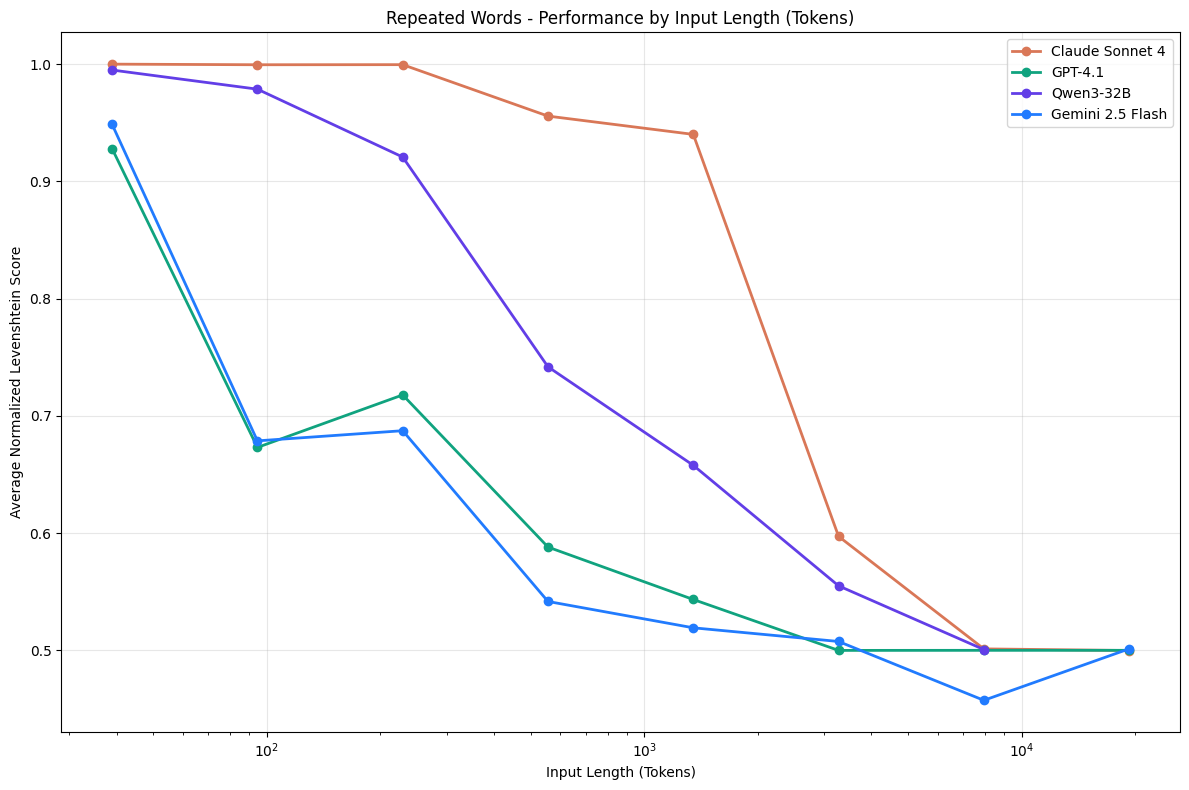 Chroma Research: Performance drops as context grows across Claude, GPT-4.1, Qwen, and Gemini.
Research backs this up. A Chroma study tested 18 leading LLMs and all showed degradation as context expanded. Models claiming 200K tokens typically become unreliable around 130K. The drops are sudden, not gradual.
The Tangent Tax
Every side conversation pollutes the context. That Tailwind detour I mentioned? Totally avoidable. Should have opened a new session, asked the question, closed it. Instead I dumped 2,000 tokens of irrelevant CSS discussion into my RSS session.
Debugging rabbit holes are worse. I spent an hour chasing down a XML encoding issue. Every failed attempt, every stack trace, every “let’s try this instead” ate more tokens. By the time I found the fix, the context was 40% debugging garbage and Claude couldn’t remember what the RSS feed was even supposed to do.
You’re not just using context. You’re spending it. Every token is a resource.
The Compaction Tax
When context hits ~95% capacity, Claude Code compacts. It summarizes the conversation to make room.
This takes time. You sit there waiting while it figures out what to keep.
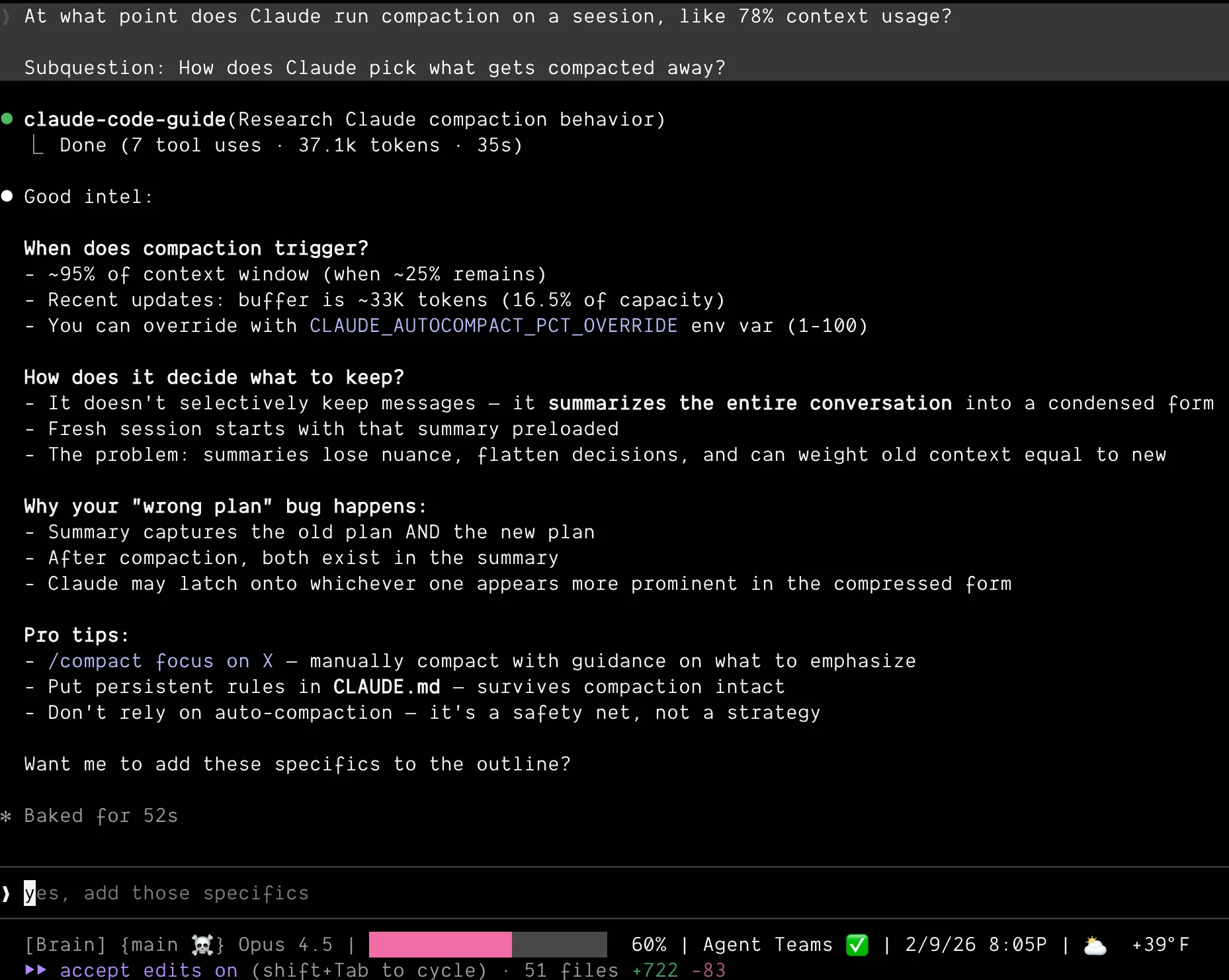 Compaction triggers at ~95% capacity and summarizes everything. Old and new context flattened together.
See my pink colored bar at 60%? Getting up there 🫠
Compaction triggers at ~95% capacity and summarizes everything. Old and new context flattened together.
See my pink colored bar at 60%? Getting up there 🫠
Worse: it sometimes gets it wrong. During a refactor on this blog, compaction kicked in and Claude picked up a routing pattern I’d abandoned an hour earlier. Started rewriting files to match the old approach. I didn’t catch it for ten minutes. Ten minutes of work I had to undo, plus the cognitive overhead of figuring out what went wrong and why Claude suddenly changed direction.
Here’s the thing: compaction doesn’t selectively keep messages. It summarizes everything into a condensed form. Old context and new context get flattened together. Nuance disappears. That routing decision I’d made? Compaction flattened both the old and new approach into one summary. Claude couldn’t tell which one was current.
If you’re hitting compaction regularly, you’ve already lost. The session is too long.
How to Manage AI Context Windows
Start fresh more often. I used to think restarting meant I’d failed. Like I couldn’t hold a conversation with my AI for more than an hour. Ego. Now I restart constantly and ship faster. If the important stuff is in files (CLAUDE.md, AGENTS.md), fresh sessions start smart. Sessions end. Files persist.
Pro tip: /clear in Claude Code gives you fresh context without restarting. Keeps your working directory, clears the conversation.
Compact before it compacts you. Finished a big chunk of work but not the whole feature? Don’t wait for the 95% auto-trigger. /compact in Claude Code lets you manually compress context whenever you want. You can even tell it what to keep:
/compact Keep context around our RSS feed work and the schema decisionsYou control what gets summarized instead of letting the AI decide under pressure at the worst possible moment.
Build durable markdown files. CLAUDE.md, AGENTS.md, decision logs in /docs. That’s your AI’s long-term memory. Every decision you write down is a decision you never have to re-explain. Next session reads those files and starts with full context, zero token debt. I accidentally turned this habit into a whole system.
This is context engineering — the practice of intentionally shaping what goes into your AI’s context window, and what doesn’t. Not vibe coding (accepting whatever the AI does), not blind prompting. Deliberate curation of what the model knows, when.
Scope your sessions. One session, one goal. Don’t do feature work and debugging and refactoring in the same session. If I’d scoped the RSS work into separate sessions, I’d have finished faster than that marathon three-hour session. One for architecture, one for each endpoint, one for debugging. Finished a task? Start fresh for the next one.
Consider subagents. What if you could spin up fresh context on demand? A subagent does one task with clean context, returns the result. Parent orchestrates, children execute fresh. No pollution between tasks.
More on that in the next post.
The Mindset Shift
Stop treating sessions like relationships. Continuous, precious, hard to end.
Start treating them like sprints. Focused, finite, designed for fresh starts.
The AI doesn’t have feelings about being restarted. Your codebase doesn’t care how many sessions it took. Only your output matters.
Context is a resource. Spend it wisely, and know when to get a fresh wallet.
Context rot isn’t a bug in the AI. It’s physics. Finite windows, infinite conversations, something has to give.
Once you understand it, you can work with it. Start fresh more often. Scope your sessions. Externalize your decisions.
Your AI will feel smarter. It’s the same AI - you’re just not drowning it anymore.
Next up: I kept restarting sessions and tracking progress in a file. Felt dumb. Then I realized I was manually doing what subagents do automatically.