I Mass-Deleted My MCP Servers. Here's What I Use Instead.
MCP servers burn your most valuable resource: context. I replaced mine with skills and CLI tools. Same capabilities, a fraction of the overhead.
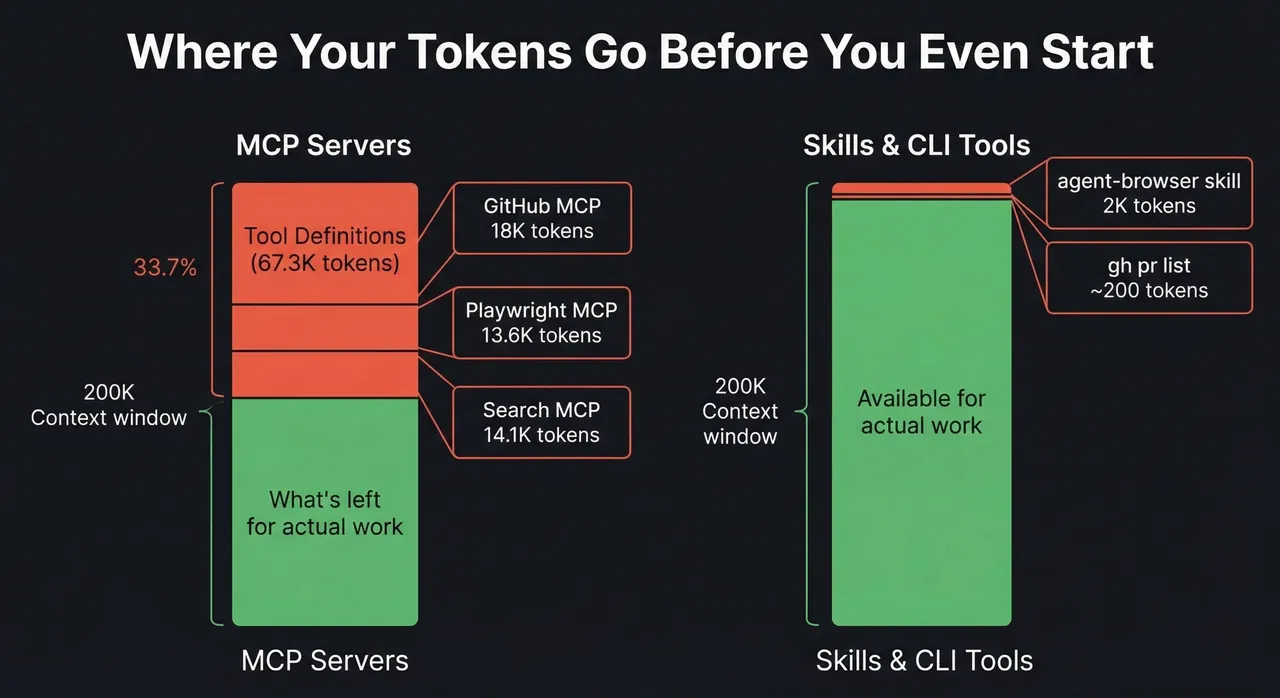
Three servers shown; remaining 21.6K is overhead from other servers in the setup.
I mass-deleted my MCP servers last week.
Not because they stopped working. Because I finally measured what they were costing me.
I’ve been writing about context rot for months now. How every token matters. How your AI gets dumber the longer you use it. How context is a resource you spend, not an infinite well you draw from. I believed all of that. Then I looked at my own setup and realized I was burning 67,000 tokens before I even typed a question. Every single session.
The culprit? MCP servers. Sitting there. Doing nothing. Eating tokens.
The MCP Tax You Don’t See
MCP - Model Context Protocol - is how AI tools connect to external services. GitHub, databases, browsers, APIs. Every MCP server registers its tools with the AI at the start of a session. The AI needs to know what tools are available so it can decide when to use them.
Sounds reasonable. Here’s the problem: those tool definitions are expensive.
I had seven MCP servers configured. Want to guess how many tokens that cost me?
67,300 tokens. Gone before I said hello.
Users in a Claude Code GitHub issue1 measured the exact overhead for a similar setup. Here’s the breakdown:
System prompt:      2.7k tokens   (1.3%)
System tools:      14.4k tokens   (7.2%)
MCP tools:        67.3k tokens  (33.7%)  ← This.
Custom agents:      0.4k tokens   (0.2%)
Memory files:       1.7k tokens   (0.9%)
Nearly 80% of the pre-conversation overhead is MCP tool definitions. Tools I might not even use in that session. Even the MCP protocol team flagged it2, and context overload is their number one community complaint.
It Gets Worse
I thought I was bad. Then I read what other people were dealing with.
One developer3 measured 81,986 tokens across his MCP servers, gone before a single question, before a single word of actual work. His search MCP alone was 14,114 tokens: mcp-omnisearch bundles Tavily, Brave, Kagi, Perplexity, FastGPT, Jina AI, Exa AI, and Firecrawl into one server. He wanted web search. He got eight providers and a context bill. 😆
You know what else does web search? ddgr. A DuckDuckGo CLI. ddgr --np --json -n 5 "context window overhead" and you’re done. About 550 tokens for the command and results. 14,114 tokens loaded permanently vs ~550 tokens loaded when you actually search. One eager-loads eight providers you never asked for; the other searches the web on demand and shuts up.
Cloudflare did the math on their own API. A traditional MCP server exposing the full Cloudflare API would consume over two million tokens4. That’s twice the largest context window available right now. For one MCP server.
And here’s the kicker from an ArXiv study5 published last month: fully augmented MCP tool descriptions add 67% more execution steps for a 5.85 percentage point accuracy gain. You’re burning more tokens AND the AI takes longer to finish. The tool descriptions aren’t just eating context; they’re making the AI less efficient at actually using them.
Turns out I was hemorrhaging tokens on tool definitions I barely used.
The Moment It Clicked
I was debugging a Playwright automation issue. I had the Playwright MCP server configured because that’s what everybody does. Connect MCP, get browser tools, automate things.
Then I looked at what was actually happening. The Playwright MCP loaded 21 tool definitions. ~13,600 tokens. Every session. Whether I touched a browser or not.
Meanwhile, there’s agent-browser from Vercel Labs. A Rust+Node.js CLI that talks to Chromium directly via CDP. No Playwright dependency. No MCP server. Just a binary you install and a skill that teaches the AI how to use it. Total context cost: about 2,000 tokens. And it only loads when the AI actually needs browser automation.
Same capability. Roughly 1/7th the context cost. No server running. No JSON-RPC protocol. No tool schemas sitting in memory.
And it’s not just the upfront definitions. The Playwright MCP bleeds tokens on every interaction too. Navigate to a page? The MCP dumps the entire DOM structure back into context. Claude Code literally warns you about it:

One page navigation. 10-11K tokens. Do three or four of those in a session and you’ve burned another 40K+ tokens on page snapshots alone, on top of the 13,600 tokens of tool definitions already sitting in context.
Agent-browser uses a snapshot-ref pattern designed for AI consumption. Compressed accessibility snapshots, reference IDs for interaction. The responses are a fraction of the size because the tool was built for agents, not retrofitted from a testing framework.
That’s when I started questioning everything.
The Real Problem: Eager vs Lazy Loading
The MCP vs CLI debate is really a question of when things load into context.
MCP servers are eager-loaded. Every tool definition gets dumped into the context window at session start. All of them. Every time. The GitHub MCP registers 27 tools whether you’re doing git work or not. The Playwright MCP loads 21 browser automation tools whether you touch a browser or not. Omnisearch loads 20 search tools across eight providers whether you search or not. They’re always there. Always consuming.
Skills and CLIs are lazy-loaded. Nothing exists in context until the AI actually needs it. Then it loads just what’s necessary, does the work, and the context cost is the work itself - not a permanent tax.
Think of it like progressive disclosure for AI tooling. The base layer is the AI and its built-in tools: bash, file reads, file writes. That’s always there. When the AI needs browser automation, a skill loads on demand - ~2,000 tokens of workflow instructions. When it needs to search GitHub, it runs gh pr list - the command and output cost maybe 200 tokens. When it needs web search, it runs ddgr - same deal.
Nothing preloads. Everything is on-demand.
Skills Are the Disclosure Layer
Skills are how progressive disclosure actually works in practice. They’re the mechanism, and they have two distinct parts.
The first part is the trigger: a description field in the skill’s frontmatter where you code in the intent keywords Claude watches for. The agent-browser skill’s description says “Use when the user needs to navigate websites, interact with web pages, fill forms, take screenshots.” When you say “go to this page and click the signup button,” Claude matches that intent against skill descriptions and fires the right one. No protocol. No tool registration. Just pattern matching against a plain text description you control.
The second part is the command reference: the body of the skill file is a complete manual for the CLI: every subcommand, every flag, with examples. Not a pointer to documentation. The actual documentation, right there. When the agent-browser skill activates, Claude already knows agent-browser snapshot -i returns interactive elements with refs, that agent-browser fill @e2 "text" fills an input, that --headed shows the browser window. It doesn’t need to run --help. The skill IS the help.
That’s the real comparison with MCP. The Playwright MCP loads 21 tool definitions and Claude has to figure out how to map those to your intent. The agent-browser skill activates on matching intent and gives Claude a precise roadmap for this specific CLI. About 2,000 tokens, loaded only when you actually need a browser.
And skills compose without stacking cost. Each one loads independently, on demand. Three skills don’t cost 3x, they cost whatever you actually invoke in that session.
Skills + CLI: The MCP Replacement
Neither piece works alone. A CLI is just a command the AI already knows how to run. A skill is just a prompt with no teeth. Together? They’re the full MCP replacement at a fraction of the context cost.
The skill is the disclosure layer. It knows when to invoke the tool, what flags matter, and what to do with the results. The CLI is the execution layer. Zero context cost until the moment of invocation. No server. No protocol. No tool schemas.
Take GitHub. The CLI is gh. The AI already knows it. A skill wraps it with project context: “When reviewing PRs, check the diff and run the test suite. Use gh pr list to find open PRs, gh pr diff to review changes.” That’s maybe 300 tokens of workflow context, loaded when the AI needs to do PR work. The CLI call itself? gh pr list --repo cli/cli --limit 5 - about 200 tokens for the command and output.
Total: ~500 tokens, on demand. The GitHub MCP? 18,000 tokens, every session. That’s a 36x difference. I actually measured it.
Or web search. The CLI is ddgr - DuckDuckGo from the terminal:
ddgr --np --json -n 5 "context window overhead"Structured JSON results. ~550 tokens for the command and output. A skill adds the guardrails: when to search, how many results, prefer --json for structured output. Maybe 200 tokens. The mcp-omnisearch server does the same thing for 14,114 tokens loaded at session start, sitting in context whether you search or not.
The pattern is always the same:
| Capability | MCP (eager-loaded) | Skill + CLI (on-demand) |
|---|---|---|
| GitHub | ~18,000 tokens | ~500 tokens |
| Browser automation | ~13,600 tokens | ~2,000 tokens |
| Web search | ~14,100 tokens | ~550 tokens |
| Total | ~45,700 tokens (always) | ~3,050 tokens (only when used) |
And those skill + CLI numbers only hit context when the AI actually needs that capability. Most sessions, you’re using one or two of these. The rest cost zero.
CLI tools bring their own advantages too:
- Self-documenting.
gh pr list --helpteaches the AI what’s available. On demand. Not preloaded into every session. - Universal. Every AI model knows how to use CLI tools. It’s trained on millions of examples. No protocol needed.
- Zero idle cost. The tool doesn’t exist in context until the AI decides to use it. Then it’s a bash command and its output. Done.
One caveat: this only works when a CLI already exists for the service you need. For the common case, APIs with an OpenAPI spec but no native CLI, I reach for CommandSpec to generate one. More on that below.
How I pick the execution layer:
- Existing CLI available? Use it. (
gh,ddgr,kubectl,psql…) - API has an OpenAPI spec but no CLI? Generate one with CommandSpec.
- No spec either? Write a small custom script.
But the biggest advantage is composability.
CLIs Compose. MCPs Don’t.
MCP tools are isolated function calls. Call one, get a result, call the next. Each call is a separate round trip. Each result lands in context. Want to list your PRs, filter by author, and check which ones have failing CI? That’s three separate MCP tool calls, three results in context, three round trips while the AI figures out how to chain them.6
With CLI tools:
gh pr list --author @me --json number,title,statusCheckRollup | jq '.[] | select(.statusCheckRollup != "SUCCESS")'One line. One result. The AI already knows how pipes work. It knows jq. It knows how to chain grep, sort, head, wc. Decades of composable tooling that MCP completely ignores.
Here’s a real one I use. I want to search the web for something, then fetch the most relevant result:
ddgr --np --json -n 3 "Claude Code skills tutorial" | jq -r '.[0].url' | xargs curl -s | html2textSearch DuckDuckGo, grab the first URL, fetch the page, convert to readable text. One pipeline. With MCP, that’s at minimum three separate tool calls: search, fetch URL, parse content. Three round trips. Three results dumped into context. The omnisearch MCP even has separate tools for searching and fetching - so the server itself acknowledges these are multi-step operations that it can’t compose internally.
The AI is great at writing pipelines. It’s trained on millions of shell scripts. Every time you give it a CLI tool, you’re giving it a building block it already knows how to snap together with every other CLI tool on the system.
Every new CLI you install multiplies the power of every CLI you already have. ddgr composes with jq composes with curl composes with html2text. Install gh and suddenly you can pipe PR data into jq for filtering, wc -l for counts, sort for ordering. Each tool doesn’t add one capability, it multiplies the combinatorics of your entire system. That’s what Legos do. Each new brick snaps into every brick you already own.
MCP servers don’t do that. The GitHub MCP talks to GitHub. The Playwright MCP talks to the browser. They don’t talk to each other. Want to search GitHub PRs and open the result in a browser? Two MCP servers, two tool calls, manual glue in between. With CLIs: gh pr view 123 --web. Done. The tools compose because they all speak the same language: stdin, stdout, exit codes. Unix got this right fifty years ago.
MCP tools are islands. CLIs are Legos. And the AI already knows how to build with Legos.
The AI doesn’t need a protocol to talk to GitHub. It needs gh and a skill that knows your workflow. It doesn’t need a protocol to search the web. It needs ddgr and a skill that knows when to search. It doesn’t need a protocol to talk to your database. It needs psql. It doesn’t need a protocol to manage your infrastructure. It needs kubectl.
The tools already exist. They’ve existed for decades. MCP reinvented them as isolated islands with a permanent seat in your context window. Skills + CLI give you composable Legos with progressive disclosure instead of a 45,000 token upfront tax.
The Problem Nobody Solved
Here’s the catch: not every API has a CLI.
GitHub has gh. Kubernetes has kubectl. AWS has aws. But what about Dittofeed? Linear? Your internal APIs? Hundreds of services with OpenAPI specs and no CLI.
That’s the gap MCP was filling. For the common case, services with a decent OpenAPI spec, CommandSpec is the fix.
CommandSpec
CommandSpec takes any OpenAPI spec and generates a complete Go CLI. Point it at a Swagger doc, get a fully typed CLI styled after gh. Every endpoint becomes a command. Every parameter becomes a flag.
# Instead of loading a 50-tool MCP server:
dittofeed emails list --limit 10
dittofeed segments create --name "Active Users" --definition '...'
Your AI runs those commands like it runs any other CLI tool. Tiny context footprint. No server. No protocol. The agent already knows how CLIs work.
The generated CLIs are self-documenting:
dittofeed emails --help
dittofeed emails list --help
The AI discovers available operations on demand instead of having every possible operation preloaded into context. That’s the difference between 200 tokens when you need it and 18,000 tokens whether you need it or not.
The Real Cost of MCP
Tokens are the obvious cost. The downstream cost is what kills you.
Remember LLM context rot? Every token of MCP overhead pushes you closer to compaction. Compaction flattens nuance. The AI starts forgetting constraints, repeating rejected ideas, drifting off task. I wrote a whole post about this.
Every session starts with 67,000 tokens of noise before you’ve done anything. That’s not just waste, it’s signal degradation. The AI has to reason through tool schemas it’ll never use to get to your actual question. You’re not just paying a token tax; you’re making every response slightly dumber before you’ve typed a word.
And with subagents? Each child agent inherits the MCP configuration. Fresh context, sure, but 67K of it is immediately consumed by tool schemas the subagent might not even need. The whole point of subagents is scoped, fresh context. MCP’s eager-loading undermines that by dumping the entire toolbox into every scope. A subagent that only needs to search the web shouldn’t start its life with 18,000 tokens of GitHub tool definitions.
“But Claude just got a 1 million token context window.” Yes, Opus 4.6 and Sonnet 4.6 just shipped with 1M context. That’s genuinely great. It’s also still 67,000 tokens of tool definitions sitting there doing nothing. The window got bigger; the waste didn’t get smaller.
Where MCP Still Makes Sense
MCP solved a real problem: giving AI a standard way to talk to external services. The protocol itself is fine. The implementation, loading everything upfront every session whether you need it or not, is the issue.
If you’re building a product where the AI needs constant access to a specific service, an MCP server makes sense. A customer support bot that always queries your ticketing system. A code review tool that always needs repository access.
But for development workflows? Where you might touch GitHub in one session, a database in the next, and a browser in a third? Loading all of that every time is wasteful. Skills and CLIs give you the same access without the permanent token tax.
Even Cloudflare saw this. Their “Code Mode” approach shrinks MCP overhead by 99.97% by having the AI write code against a typed SDK instead of registering thousands of individual tools. They’re admitting the tool-definition model doesn’t scale.
What I Actually Use Now
My current setup:
- Browser automation: agent-browser skill (~2,000 tokens, on-demand)
- GitHub:
ghCLI (~200 tokens per operation) - Web search:
ddgrCLI + skill (~550 tokens per search, on-demand) - Database:
psql/clickhouse-client(CLI tools, zero idle overhead) - File search: Built-in Claude Code tools (Glob, Grep, Read - already in the system prompt)
- Complex workflows: Custom skills (markdown files, 200-1,500 tokens each)
- APIs without CLIs: CommandSpec generated CLIs
Total MCP servers configured: zero.
Total idle context overhead from external tools: zero.
Every token in my context window is available for actual work. Zero idle overhead before I type a word.
MCPs solved a real problem. Connecting AI to external services matters. But the implementation got it backwards. Eager-load everything. Isolated tools that can’t talk to each other. A third of your context window gone before you type a question. Islands with a cover charge.
Skills + CLIs flip every one of those decisions. Progressive disclosure instead of eager-loading. Composable tools that pipe into each other instead of isolated function calls. Zero context cost until the moment of use. Legos, not islands.
Don’t take my word for it. Go check your own setup. Run a fresh Claude Code session and look at how many tokens are consumed before you type anything. The number might surprise you.
67,000 tokens of island tool definitions sitting in context before you type a word - or Legos you snap together when you actually need them. The tools already exist. They’ve existed for decades. You just have to stop paying the cover charge to use them.
Footnotes
-
Claude Code GitHub Issue #11364. User measurements of MCP token overhead across a seven-server setup. ↩
-
MCP Spec Issue #1300: Tool Filtering with Groups and Tags. The MCP protocol team’s own GitHub, describing context overload as the most frequent community concern. Quality degrades past ~10 tools. ↩
-
Scott Spence: Optimising MCP Server Context Usage. 81,986 tokens consumed before a single message, measured directly from Claude Code’s
/contextoutput. ↩ -
Cloudflare: Code Mode for MCP. 2M+ tokens for a traditional full-API MCP server; Code Mode collapses it to ~1,000. ↩
-
ArXiv 2602.14878: MCP Tool Descriptions Are Smelly. Empirical study of 856 tools across 103 MCP servers. 67% more execution steps for a 5.85pp accuracy gain in their benchmark. ↩
-
ArXiv 2602.15945: From Tool Orchestration to Code Execution. Benchmarks CE-MCP vs traditional per-tool invocation; finds traditional invocation increases coordination overhead and fragments state management at scale. ↩